
Migrating to SitecoreAI with an AI Pair: Context, Pipelines and a Review Loop
- Authors

- Name
- David Goosem
Part 3 of 3 in a series on migrating legacy Sitecore sites to SitecoreAI. Part 1 covered the challenge; Part 2 covered getting legacy data ready.
With media mapped and the legacy site serialized as text, you have what you need. This post is about what we built on top of that: a migration pipeline that an AI coding agent (we use Claude Code) can work on reliably, with people deciding things and running anything that writes to a CMS.
This isn't another "the AI did it all" story. The interesting part is how to set things up so an agent's work is grounded, repeatable and checkable. Most of what's below is also just good migration practice.
What an agent is good and bad at
An AI coding agent is good at:
- reading and searching large numbers of text files quickly
- following written rules consistently
- writing and running scripts, and reading their output
- making small, precise code changes
It's bad at:
- remembering anything between sessions that isn't written down
- operating a live CMS UI
- telling the difference between a rule you confirmed and one it inferred
- knowing what else a change affected
Every decision below aims to play to the first list and protect against the second. That's also why the groundwork in Part 2 matters so much: it turns the legacy site and the media mapping into text and lookups the agent can read and check.
Give it context, not just files
An agent with tens of thousands of YAML files and no guidance will produce a confident mess. What made the difference for us was a small, structured set of migration documents in the repo, next to the scripts:
| Document | Purpose |
|---|---|
context.md | The entry point: current state, a handoff for the next session, how a review round works, working agreements, gotchas, and a rule index that says which function holds each rule |
component-mapping.md | Legacy renderings → new components, variants and styles; page branch compositions |
template-mapping.md | Legacy page templates → new page types and branches, page-level fields |
html-transform-rules.md | Rich-text clean-up and extraction rules |
media-mapping.md | The DAM mapping from Part 2 |
changelog.md | Every rule change, newest first, written to be searched rather than read |
reference/ | Condensed versions of the source material |
Condense the source material. Our project had plenty of earlier analysis in Confluence: a content analysis of the legacy site and a newer set of component requirements. The agent condensed each into a compact reference document. It also built an inventory of the legacy site and one of the target solution (templates, branches, renderings, IDs), both from serialized items. We also gave it the notes and scripts from a previous migration on the same accelerator, to reuse patterns and techniques.
A few conventions kept that context reliable:
- Every mapping is Confirmed, Proposed or Open. Scripts only use Confirmed mappings. When someone makes a decision, it's recorded with a date and the mapping is promoted. This separates facts from guesses in writing, which is exactly where an agent needs it.
- Precedence is written down. If newer requirements and older analysis disagree, the requirements win. The agent doesn't have to work that out again each session.
- The entry point stays short. Once the docs grew, we stopped expecting each session to read everything.
context.mdtells a new session: read the handoff, find the rule you're changing in the rule index,grepthe changelog for that page, and read only the function you need. Background moved to a separate history file. A smaller starting context means faster sessions and fewer mistakes from stale detail. - The handoff is updated at the end of every session, so the next session starts from a written state rather than a compacted transcript. An agent's memory is whatever you wrote down, so make it worth reading.
- Working agreements are explicit. For example: the legacy site is the source of truth for wording; don't change shared components, templates or design-system code without asking; never touch the QA sample pages; a person runs SPE scripts and commits.
The pipeline: plan offline, import in batches, pull back into git
The migration is a two-stage pipeline, and the split is deliberate:
Legacy snapshot (YAML) ─────────┐
DAM asset map (CSV) ────────────┼──▶  Local planner (PowerShell)
Mapping rules (docs + code) ────┘         │
                                          ▼
                          pages-<section>.json  (reviewable package)
                                          │
                                          ▼
                        SPE importer on the SitecoreAI CM  (dry run by default)
                                          │
                                          ▼
                       dotnet sitecore ser pull  ──▶  git diff  ──▶  commit
The planner
The planner runs locally. It walks each legacy page's layout tree (renderings, placeholders, styles, grid classes and datasources) and produces a plan. The plan covers:
- the page type and branch
- page sections, containers and their spacing
- which new component each legacy rendering becomes, with variant and styles
- transformed field values: rich text cleaned up, buttons pulled out of text into button components, tables restyled, media re-pointed through the asset map, inline tokens converted
The output is one JSON package per site section. It never touches a CM, so the agent can change a rule and re-plan a whole section in a couple of minutes, as often as needed.
The importer
The importer is an SPE script that runs on the SitecoreAI CM. These design choices are worth copying:
- Dry run by default, an explicit list of pages to process, and a CSV report every run.
- Page branches are the source of truth for component configuration. The plan names patterns such as "standard section", "centred container" or "rich text". The importer finds that rendering in a page branch and copies its parameters, variant and styles. When the design team changes a branch, the migration picks it up without a code change.
- Everything the migration creates is marked. Migration-created renderings and datasources get IDs with a recognisable prefix. A re-run removes and rebuilds only those, and never touches anything an author added.
- Branch example content is removed carefully. A page created from a branch arrives with example components. The importer removes only the ones that came from the branch and are still unchanged, then any containers left empty.
- Legacy page IDs are kept, so re-runs update pages in place and internal links keep working.
- It fails loudly. An unknown pattern, a missing shared item or a branch that has changed stops the run with a clear message. It never quietly writes half a page.
The results are then pulled back into serialization and committed, so every import shows up as a git diff.
Who does what
The agent works on the planner, the importer and the docs. A person runs the SPE scripts and owns git. The agent never writes to a CM directly, and everything it produces is reviewed before it runs. The quick, low-risk part (deciding what to write) happens locally, where the agent can iterate freely. The slow, risky part (writing to the CMS) is small, repeatable and run by a person.
The review loop: measure, fix the rule, check the blast radius
Once a section is migrated, visual review starts: page by page, comparing old with new. Each round follows the same written loop:
- Name a page and what looks wrong.
- Look before changing. A script prints the legacy rendering tree next to the plan for that page.
- Measure, don't eyeball. Another script uses a headless browser to measure the same element and its parents (size, padding, margin, background, font) on both sites. Our spacing rule is measurable: match the legacy site to the nearest value on the design system's spacing scale.
- Change the narrowest rule. The rule index points to the function. The fix goes there, never into a one-off patch on the page.
- Check the blast radius every time. Save a baseline of every page plan, re-plan, compare. Any page that changed unexpectedly gets inspected, and the rule is narrowed if needed. Signed-off pages must not change. The comparison ends by printing the exact list of pages to give the importer.
- Log it. Add a changelog entry: what changed, which pages, and what was deliberately not done.
Numbers beat screenshots for an agent. They're exact, they take up little context, and long sessions eventually stop accepting images. The blast-radius check covers the agent's biggest weakness: a rule that fixes one page can quietly reshape forty others, and the baseline comparison catches that before anything is imported.
Pain points we hit (so you don't have to)
Some of these are specific to SitecoreAI and SXA. Most will apply to any XM/XP migration.
- Dynamic placeholders. Headless placeholder keys include the parent's dynamic placeholder ID (
container-12,tab-2-34,accordion-item-3-56). Build them carefully, and know the limits, such as how many accordion items a component exposes as placeholders. - Not every component can go everywhere. For example, a tab placeholder might not accept a page section, so backgrounds inside tabs have to be carried by containers instead. Read the placeholder settings before designing a mapping.
- Sibling names must be unique. Serialization refuses two items at the same path. Three untitled accordion items all called "Item" will break your
ser pull. - Search-driven components look empty at first. Listings backed by a SaaS search product show nothing until the content is published and crawled, and the widget IDs have to exist in that environment. Don't mistake that for a migration bug.
- Branch example text leaks. If you copy a branch datasource, copy its settings and not its example content. Otherwise every migrated component without a value shows the branch's placeholder text.
- Never push before you pull. If your serialization modules allow deletes, a
ser pushbefore pulling the latest import results will delete what the import just created. - Stale caches look like broken content. After serialization pushes, clear CM caches before you assume a partial or header is broken.
- Some legacy markup is better left as markup. Bespoke HTML widgets, inline scripts and one-off layouts may be quicker to flag as MANUAL than to write a rule for. Track them so they aren't forgotten.
- Script environments differ. SPE scripts can't be fully validated outside Sitecore, local scripts may run on Windows PowerShell 5.1 with its own quirks, and file encodings matter. Write these gotchas down where the agent will read them.
What we'd tell you before you start
Put the legacy ID on everything. Assets, pages, shared datasources. It's the cheapest decision you'll make, and it turns every later step into a lookup you can check.
Make the legacy system plain text. Unicorn, SCS or a custom export: whatever suits your legacy instance. Scripts and agents both work far better from files than from a live CM.
Plan offline, import in small batches, pull back into git. Keep the risky part small and repeatable. Keep the quick part local.
Treat the context as a deliverable. Mapping docs, a rule index, a changelog and a handoff are what make session 40 as reliable as session 1. Keep the entry point short and make everything else searchable.
Check the blast radius on every change. Signed-off pages should never move without someone deciding they should.
Keep people on the irreversible steps. The agent proposes, plans, measures and explains. People run imports, approve shared-component and template changes, and commit. That's not about distrust; it's how you'd work with any engineer on production content.
Wrapping up the series
Moving from XM/XP to SitecoreAI is a replatform, not an upgrade. The front end, search, forms, media and content shape all change at once. The content migration doesn't have to be the scary part, though. With legacy IDs everywhere, a DAM round trip, the legacy site as text, a small set of focused documents and a review loop driven by measurements, it becomes a process you can see, measure and repeat. And it's one an AI pair can speed up a great deal.
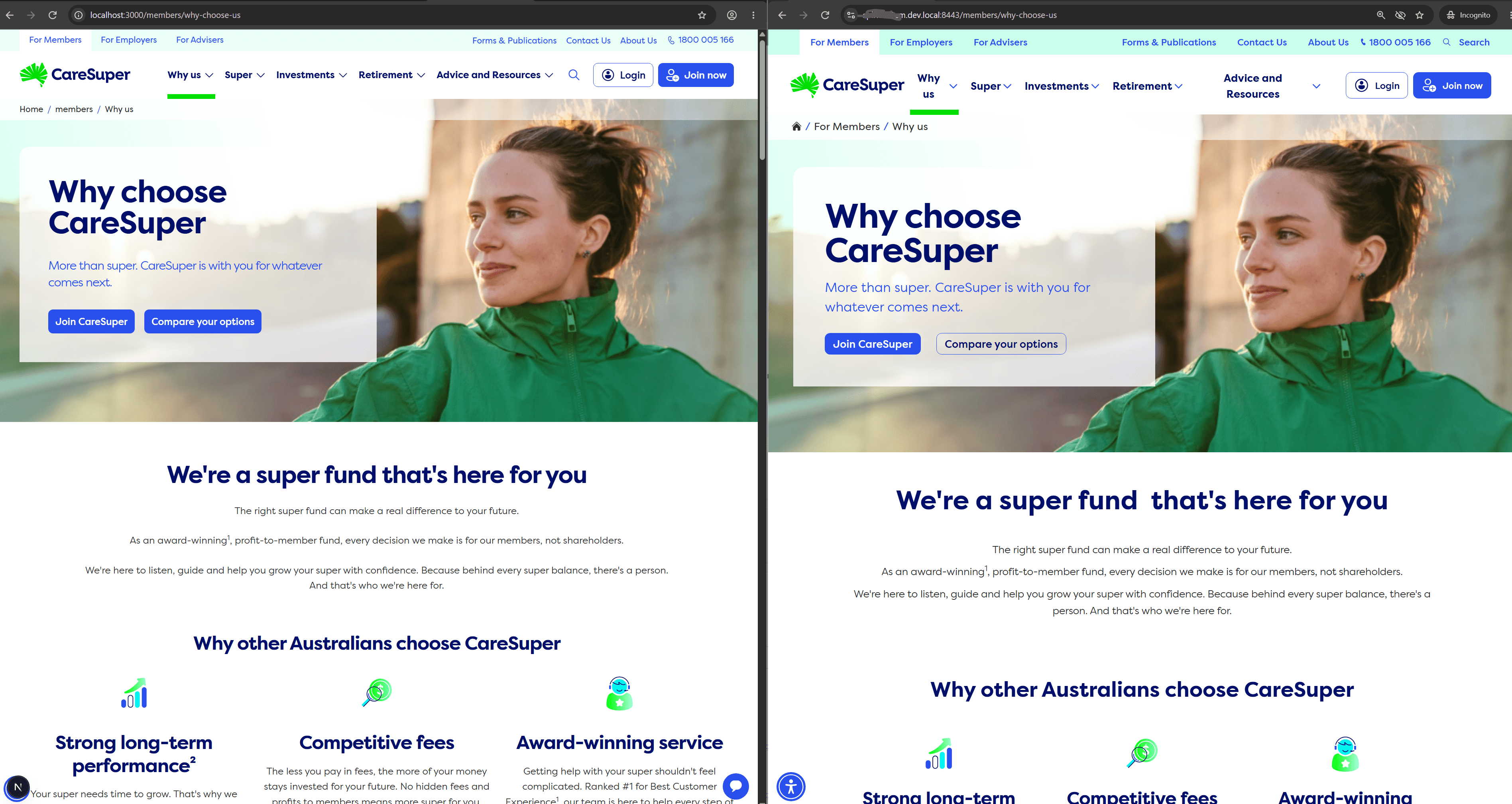
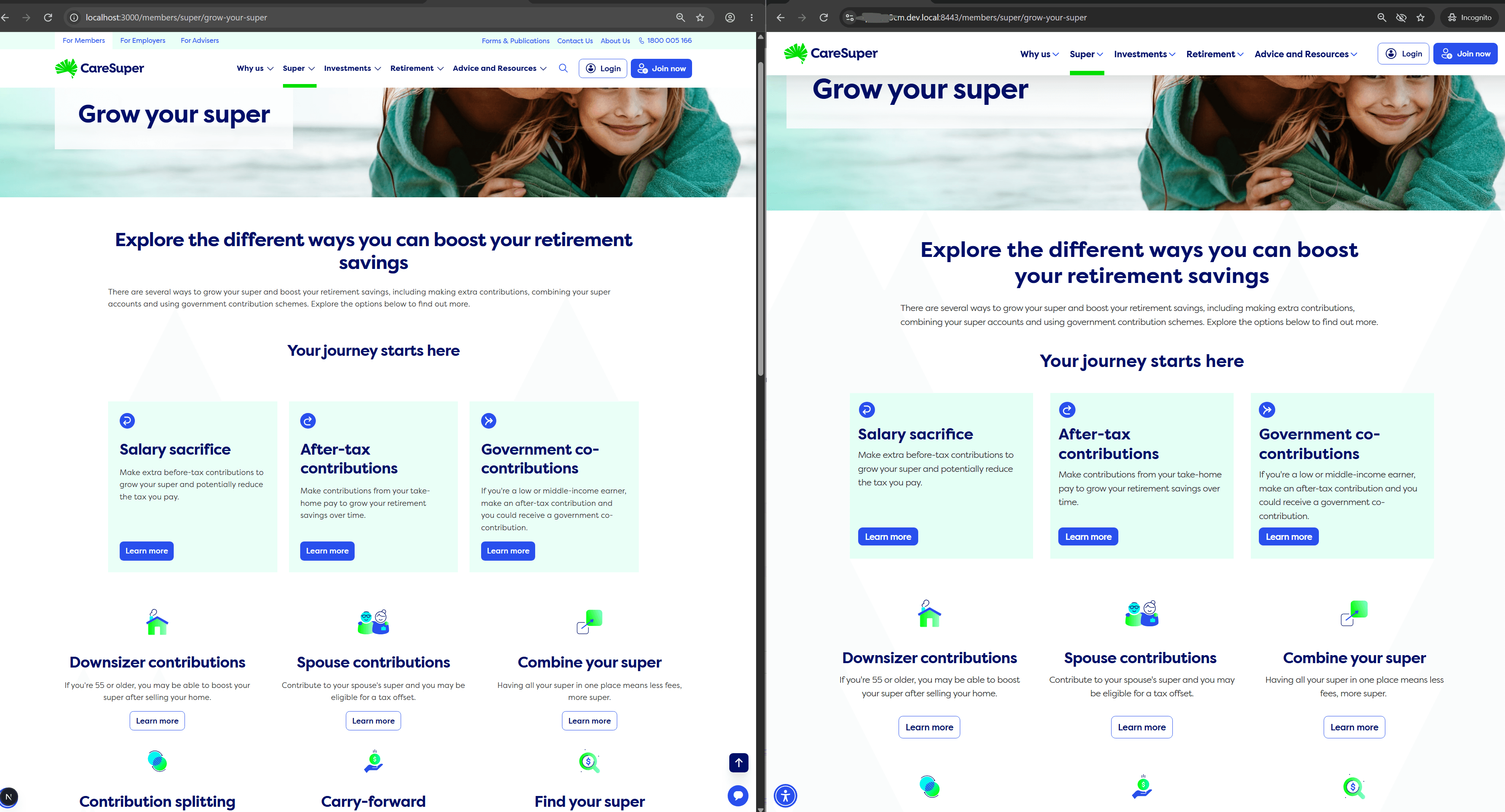
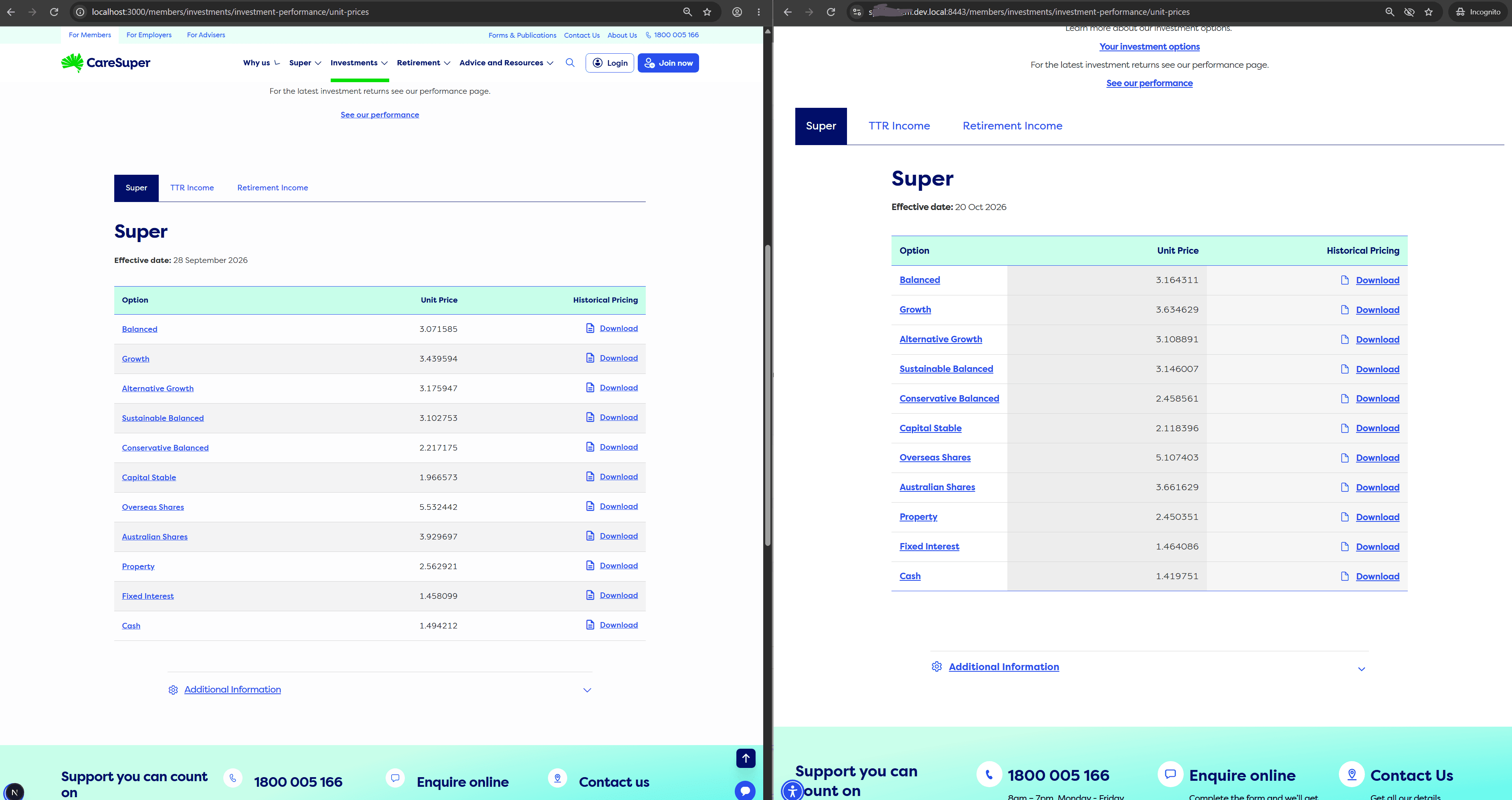
Here are a few pages from the migration to show what that looks like in practice. In each one, the new SitecoreAI build is on the left and the legacy site is on the right.
A landing page with a hero banner, intro content and feature cards:
A section page with a mix of card styles, icons and calls to action, all mapped onto the new component library:
A data-driven page with tabs, a unit price table and an accordion. The prices differ only because the two environments pull from the feed on different dates:
The full series:
- The Road to SitecoreAI
- Getting Your Legacy Data Migration-Ready
- Migrating with an AI Pair (this post)