
Generating Dynamic PDFs and Emails in a SaaS-Hosted Headless Sitecore Solution
- Authors

- Name
- David Goosem
In a headless solution—especially a SaaS-hosted one—the way you approach what has historically been a backend/server-side process (often running in your Content Delivery Sitecore instance) needs to be reconsidered. This article looks at an approach taken in a recent build where we used modern patterns fit for composable, headless solutions.
We are going to focus on the Sitecore Application Solution Design concepts for the head application only—specifically how to make the PDF/email content dynamic—not on the actual generation/service itself (we'll get into the 'why' shortly).
The high-level requirements:
We have a solution with our Sitecore head application using NextJS, hosted in Vercel.
We have a product calculator page which lets end users plug in their specifications for a series of products, and it outputs the quantities of each product they need. There's a whole complicated form with options to add line items, etc., through a nice UI. However, at the end of the flow, the user can opt to generate a PDF with their calculation line items or send it to themselves via email.
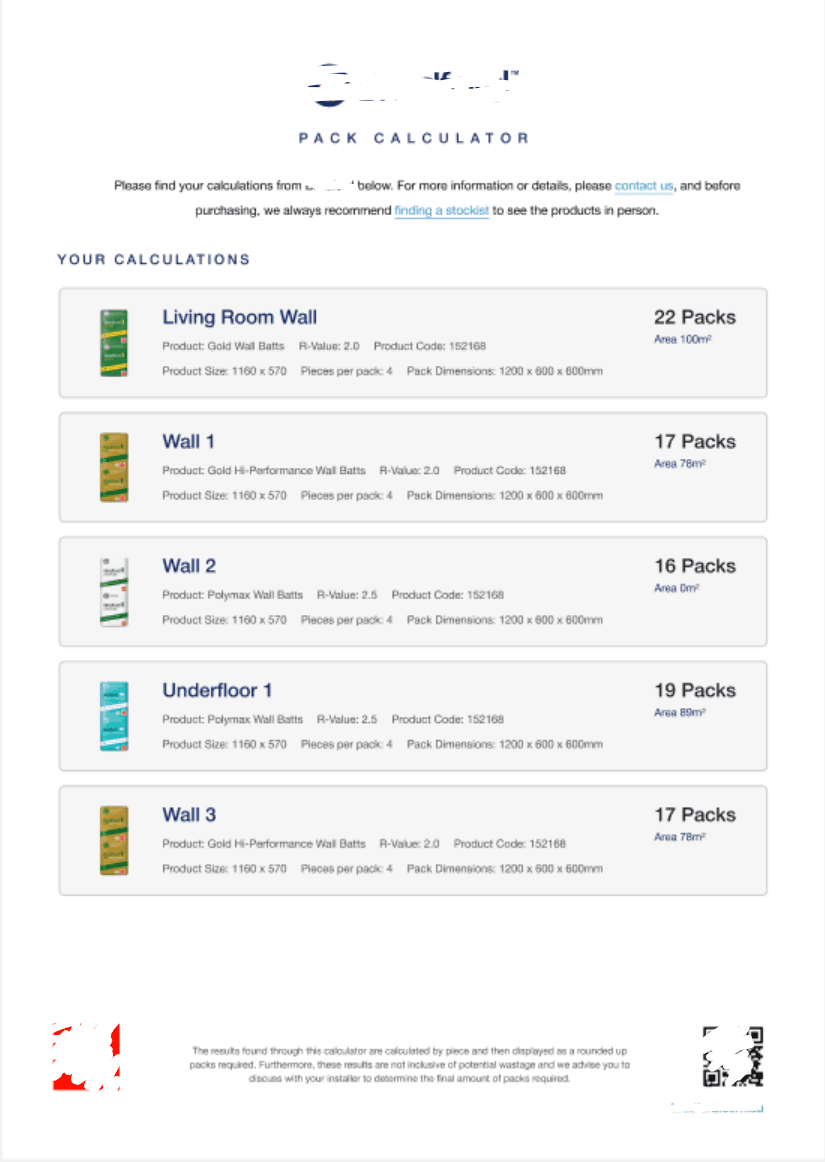
An example of the PDF template design is below. The Email template is very similar with some extra bits in the footer. When the user clicks on the "Generate PDF" call to action, we want to take this dynamic data which is all coming from a products API to the UI and generate the PDF.
To add to the complexity, the header and footer of the templates must be content managed within Sitecore, and the content will potentially be different per site or per product (other use cases).
The problem statement:
There are a couple of challenges we need to solve here—let's take a look:
- In a headless solution hosted in Vercel, you can't really (reliably) use something like puppeteer as the executable required to use this is quite large and may exceed the limit for storage you have.
- If you have a multi-head/multi-site solution you really don't want to need this giant executable in multiple heads and we should be looking at a middleware/api option to centralise the pdf and/or email sending so we can use it from each site that needs it.
- We need a way to get the content-managed template data out of Sitecore
- We need a way to create the actual template HTML and map our specific user-managed data into it
- We need the browser to know it's a PDF so it does the browser-default PDF behavior (download or open in the browser)
- API and Sitecore communication must be secure (i.e., executed server-side in our Next.js app)
- We need some kind of persisted state so data is retained per user session (through reload or otherwise) and to help store the data used by a number of React elements in the construction of this feature.
Solution design to satisfy these requirements in our Vercel-hosted NextJS application?
We're going to focus on the PDF generation scenario here. Both PDF and email use the same approach, ultimately just using different downstream services. The PDF scenario is more interesting because we need the browser to handle a PDF in the response.
High level concepts
The entry point to all of our "Generate PDF" and "Generate Email" actions is going to be a CTA/link in the UI, which we'll set to target a Next.js API Route endpoint (sample code below). As per convention, we've put the API route within our NextJS app's <root>/src/pages/api/products folder (wherever you like in here, as long as you know the path). Our link to trigger this would be something like this (where "generate-pdf" is the name of our API route file):
<a class="btn btn-style-primary download btn-size-md" href="/api/products/generate-pdf"
  ><span class="btn-icon icon-font-download">Generate PDF</span></a
>
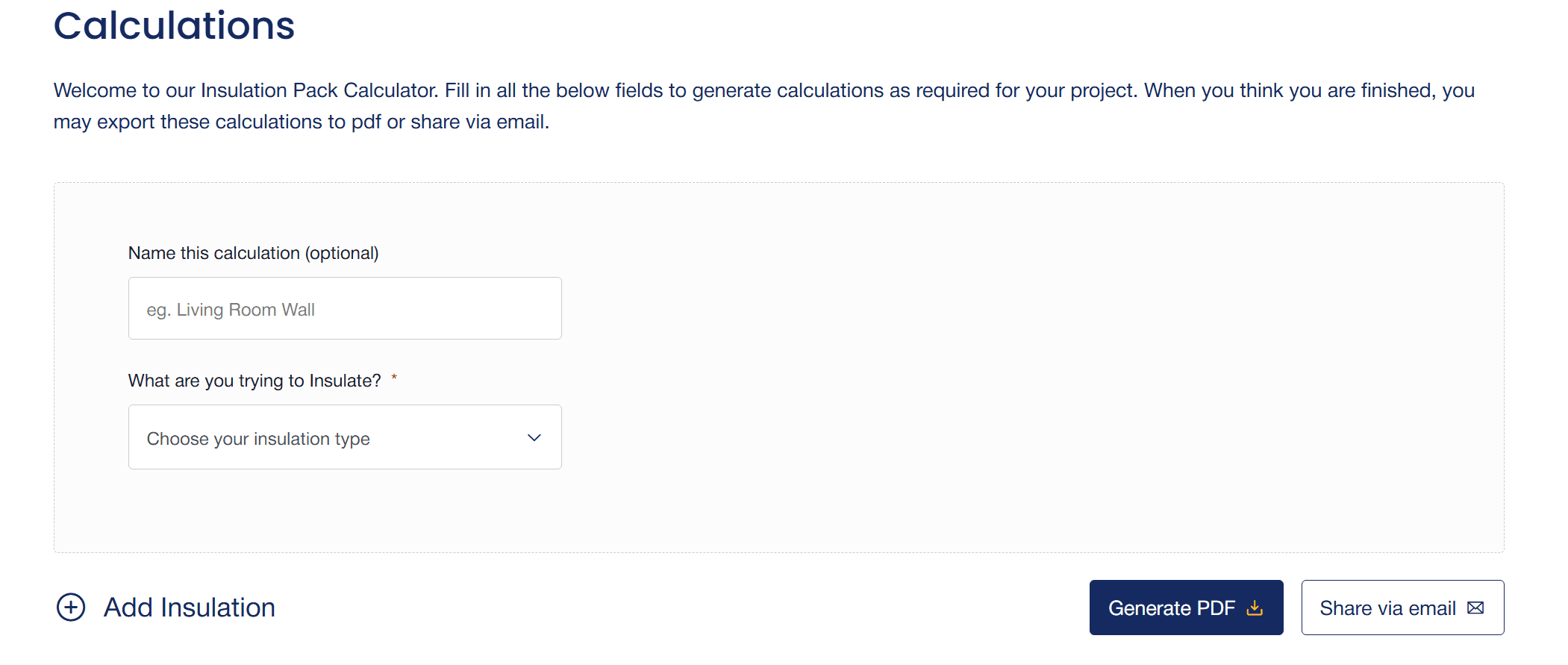
A visual representation is shown below (the Generate PDF and Share via email links)
API
Used for communication with business services (pdf generation and email send as well as Product Data fetching).
All API communication in the solution uses the same server-side service approach which can be called by the client but the execution of requests with the secrets is not exposed to the client.
Product Data API
This API has a series of endpoints we can call to get the product data we need to display and store in our persisted storage for usage with the UI and then to send to the PDF and Email services later.
The PDF and Email Generation services
Both are downstream APIs which will take care of this for us (notice we aren't building that into the NextJS application, and we're employing proper composable architecture).
I won't include the actual API data services here, but it's not too dissimilar to what you see here already noting that the service itself is only executed server-side and pulls the secrets in from environment variables.
// React/Next
import { NextApiRequest, NextApiResponse } from 'next'
import { getPackCalcPDFString } from '@namespace/app/src/organisms/products/PackCalcPDF'
import { generatePDFfromHTML } from '@namespace/package/src/business-services/generate-pdf'
import { pipeline } from 'stream'

import { getExportTemplates } from '@namespace/package/src/graphql/ExportTemplateContent'
import { ExportTemplateProps } from '@namespace/app/src/props/export-template-props'
import { PackCalculatorSelectedPacks } from '@namespace/app/src/props/pack-calculator-props'

export default async function handler(req: NextApiRequest, res: NextApiResponse) {
  try {
    if (req.method !== 'POST') {
      return res.status(405).json({ message: 'Method Not Allowed' })
    }

    const data = req.body as PackCalculatorSelectedPacks

    const site = req?.query?.siteName as string

    const siteName = site === 'Country-NZ' ? 'CountryNZ' : 'CountryAU'

    const baseDomain = `https://${req?.headers?.host}`

    // Retrieve the full list of "complete" products in the request body
    // This is pulled from the Persisted State store we have set up for the Products data in the related UI component.

    const packCalcProducts: PackCalculatorSelectedPacks = {
      calculations: data.calculations?.filter((calc) => calc.isComplete === true) ?? [],
    }

    // Go get the PDF template data from Sitecore
    const packCalcExportTemplate = await getExportTemplates(
      baseDomain,
      `/sitecore/content/App/${siteName}/Data/PDF Templates`
    ).then((result) => {
      const pdfTemplate = result.list[0]

      return pdfTemplate as ExportTemplateProps
    })

    if (!packCalcExportTemplate) {
      return res.status(500).json({ error: 'PDF template not found for product type' })
    }

    // This method calls another Next.js API route which has been exposed (for other usages of PDF generation) that just calls the business API PDF generation service
    // and returns the PDF response that we can then use in this API Route response to tell the browser it's a PDF (see below).
    // The `getPackCalcPDFString()` method takes the items in the persisted storage and the CMS-managed values from the Sitecore PDF template data to populate the template.
    const generatePDFResult = await generatePDFfromHTML(
      getPackCalcPDFString(packCalcProducts, packCalcExportTemplate),
      'Pack Calculator Products'
    )

    if (!generatePDFResult?.isSuccess) {
      return res.status(500).json({ error: generatePDFResult?.message || 'Failed to generate PDF' })
    }

    const readableStream = (
      generatePDFResult.result as { stream: () => NodeJS.ReadableStream }
    ).stream()

    const pdfFileName = `Pack Calculator Products.pdf`

    // Set headers for file download

    res.setHeader('Content-Type', 'application/pdf')
    res.setHeader('Content-Disposition', `attachment; filename="${pdfFileName}"`)

    // Pipe the readable stream to the response
    pipeline(readableStream, res, (err) => {
      if (err) {
        console.error('Pipeline failed:', err)
        res.status(500).json({ error: 'Internal error' })
      }
    })
  } catch (err) {
    console.error(err)
    res.status(500).json({ error: 'Internal error' })
  }
}
React email and PDF template HTML
A standard React component that contains all the code to generate the template HTML and populate it with the right data, which we will pass in from our upstream calls.
Below is a sample component which gets called from the initial API route above.
import React from 'react';
import { renderToString } from 'react-dom/server';
import { ExportTemplateProps } from '@namespace/app/src/props/export-template-props';
import PackCalcTiles from '@namespace/app/src/atoms/products/PackCalcTile';
import { PackCalculatorSelectedPacks } from '@namespace/app/src/props/pack-calculator-props';

// NOTE: The PDF generation service does not support all Flexbox styles, so we use inline styles and only limited Flexbox.
export const PackCalcPDF = (
  selectedPacks: PackCalculatorSelectedPacks,
  templateProps: ExportTemplateProps
): React.JSX.Element => {
  return (
    <div style={{ color: '#1C1F27', fontFamily: 'Helvetica' }}>
      <div
        style={{
          textAlign: 'center',
          padding: '20px 10px',
          backgroundColor: '#ffffff',
        }}
      >
        <div style={{ width: '250px', margin: '0 auto' }}>
          <img
            src={templateProps?.headerLogo}
            alt='Company Logo'
            style={{ width: '100%', height: 'auto' }}
          />
        </div>
        <h1
          style={{
            fontSize: '20px',
            fontWeight: '500',
            color: '#162A62',
            letterSpacing: '5px',
            lineHeight: '1.5',
            marginTop: '8px',
          }}
        >
          PACK CALCULATOR
        </h1>
        <div
          style={{
            fontSize: '14px',
            fontWeight: '400',
            lineHeight: '2',
            marginBottom: '32px',
          }}
        >
          <div dangerouslySetInnerHTML={{ __html: templateProps?.introductionText }} />
        </div>
        <h2
          style={{
            fontSize: '16px',
            fontWeight: '500',
            color: '#162A62',
            letterSpacing: '2px',
            lineHeight: '1.5',
            marginTop: '8px',
            textAlign: 'left',
            margin: '0 0',
          }}
        >
          YOUR CALCULATIONS
        </h2>
      </div>

      {/* Body */}
      <div style={{ padding: '0 10px' }}>
        {selectedPacks?.calculations?.map((packDetail, index) => (
          <div style={{ marginBottom: '10px' }} key={index}>
            <PackCalcTiles {...packDetail} />
          </div>
        ))}
      </div>

      {/* Footer */}
      <div style={{ padding: '15px 10px 0 10px' }}>
        <div
          style={{
            display: 'flex',
          }}
        >
          <div style={{ textAlign: 'center', margin: '0' }}>
            <a
              href={templateProps?.footerImageLink?.href ?? '#'}
              target='_blank'
              rel='noopener noreferrer'
            >
              <img
                src={templateProps?.footerImageLeft}
                alt='Logo'
                style={{ maxWidth: '40px' }}
              />
            </a>
          </div>
          <div style={{ textAlign: 'left', padding: '0 20px' }}>
            <span
              style={{
                margin: 0,
                color: '#909491',
                fontSize: '8px',
                fontStyle: 'normal',
                fontWeight: '400',
                lineHeight: 'normal',
                textAlign: 'center',
              }}
            >
              <div dangerouslySetInnerHTML={{ __html: templateProps?.footerCenterCopy }} />
            </span>
          </div>
          <div style={{ textAlign: 'center', margin: '0' }}>
            <img src={templateProps?.footerImageRight} alt='QR Code' style={{ maxWidth: '40px' }} />
          </div>
        </div>
        <div style={{ textAlign: 'right', width: '100%', fontSize: '6px', margin: '0' }}>
          <div
            style={{ fontSize: '6px', fontFamily: 'Helvetica' }}
            dangerouslySetInnerHTML={{ __html: templateProps?.footerBaseCopy }}
          />
        </div>
      </div>
    </div>
  );
};


// allow us to get the data as a string which is what the service needs to send downstream
export const getPackCalcPDFString = (
  selectedPacks: PackCalculatorSelectedPacks,
  templateProps: ExportTemplateProps
) => {
  return renderToString(PackCalcPDF(selectedPacks, templateProps));
};
The GraphQL query to Sitecore Edge to get the content-managed PDF template content from our data template:
We've got a service managing the GraphQL request/response once again; this is fairly standard in Sitecore XMCloud builds.
Again, you will see this gets called above from our initial API route.
// Utils
import {
  ExportTemplateGraphQLResponse,
  ExportTemplateQueryResultItem,
  GetGraphQLRequestByQuery,
  GraphQLQueryResult,
} from '@namespace/packages/src/graphql/client'

// Types
import { ExportTemplateProps } from '@namespace/app/src/props/export-template-props'

export const getExportTemplates = async (
  baseDomain: string,
  sitePath: string
): Promise<GraphQLQueryResult> => {
  let pdfTemplates: ExportTemplateProps[] = []

  // GraphQL query to fetch PDF templates
  const query = (sitePath: string) => `
    query {
      item(path: "${sitePath}", language: "en") {
        children {
          results {
            name
            id
            headerLogo: field(name: "HeaderLogo") {
              value: jsonValue
            }
            headerLogoLink: field(name: "HeaderLogoLink") {
              value: jsonValue
            }
            introductionText: field(name: "IntroductionText") {
              value: jsonValue
            }
            closingText: field(name: "ClosingText") {
              value: jsonValue
            }
            stockistLink: field(name: "StockistLink") {
              value: jsonValue
            }
            contactLink: field(name: "ContactLink") {
              value: jsonValue
            }
            termsAndConditions: field(name: "TermsAndConditions") {
              value: jsonValue
            }
            footerImageLink: field(name: "FooterImageLink") {
              value: jsonValue
            }
            footerImageLeft: field(name: "FooterImageLeft") {
              value: jsonValue
            }
            footerImageRight: field(name: "FooterImageRight") {
              value: jsonValue
            }
            footerCenterCopy: field(name: "FooterCenterCopy") {
              value: jsonValue
            }
            footerBaseCopy: field(name: "FooterBaseCopy") {
              value: jsonValue
            }
            facebookImageIcon: field(name: "FacebookImageIcon") {
              value: jsonValue
            }
            facebookLink: field(name: "FacebookLink") {
              value: jsonValue
            }
            XImageIcon: field(name: "XImageIcon") {
              value: jsonValue
            }
            XLink: field(name: "XLink") {
              value: jsonValue
            }
            linkedinImageIcon: field(name: "LinkedinImageIcon") {
              value: jsonValue
            }
            linkedinLink: field(name: "LinkedinLink") {
              value: jsonValue
            }
            fromAddress: field(name: "FromAddress") {
              value: jsonValue
            }
            fromName: field(name: "FromName") {
              value: jsonValue
            }
            replyToAddress: field(name: "ReplyToAddress") {
              value: jsonValue
            }
            replyToName: field(name: "ReplyToName") {
              value: jsonValue
            }
            emailSubject: field(name: "EmailSubject") {
              value: jsonValue
            }
          }
        }
      }
    }
  `

  const result: GraphQLQueryResult = {
    isValid: false,
    list: [],
  }

  let data: ExportTemplateGraphQLResponse | undefined

  try {
    data = await GetGraphQLRequestByQuery<ExportTemplateGraphQLResponse>(
      query(sitePath),
      baseDomain
    )
  } catch (error: unknown) {
    if (error instanceof Error) {
      console.error(error.message)
    } else {
      console.error(error)
    }
  }

  if (data) {
    result.isValid = true

    if (data?.item?.children?.results !== undefined) {
      pdfTemplates = data.item.children.results!.map((item: ExportTemplateQueryResultItem) => ({
        name: item.name || '',
        id: item.id || '',
        headerLogo: item.headerLogo?.value?.value || '',
        headerLogoLink: item.headerLogoLink?.value?.value || null,
        introductionText: item.introductionText?.value?.value || '',
        closingText: item.closingText?.value?.value || '',
        stockistLink: item.stockistLink?.value?.value || null,
        contactLink: item.contactLink?.value?.value || null,
        termsAndConditions: item.termsAndConditions?.value?.value || '',
        footerImageLink: item.footerImageLink?.value?.value || null,
        footerImageLeft: item.footerImageLeft?.value?.value || '',
        footerImageRight: item.footerImageRight?.value?.value || '',
        footerCenterCopy: item.footerCenterCopy?.value?.value || '',
        footerBaseCopy: item.footerBaseCopy?.value?.value || '',
        facebookImageIcon: item.facebookImageIcon?.value?.value || '',
        facebookLink: item.facebookLink?.value?.value || null,
        XImageIcon: item.XImageIcon?.value?.value || '',
        XLink: item.XLink?.value?.value || null,
        linkedinImageIcon: item.linkedinImageIcon?.value?.value || '',
        linkedinLink: item.linkedinLink?.value?.value || null,
        fromAddress: item.fromAddress?.value?.value || '',
        fromName: item.fromName?.value?.value || '',
        replyToAddress: item.replyToAddress?.value?.value || '',
        replyToName: item.replyToName?.value?.value || '',
        emailSubject: item.emailSubject?.value?.value || '',
      }))
    }

    result.list = pdfTemplates
  } else {
    console.error(
      'The PDF templates data fetch from Sitecore did not return any results for query: ' +
        query +
        ' and baseDomain: ' +
        baseDomain
    )
  }

  return result
}
Hopefully you've found this helpful. There are a number of moving pieces in this (more complicated) version, but the design patterns and concepts should get you generating content-manageable PDFs and emails from your applications.